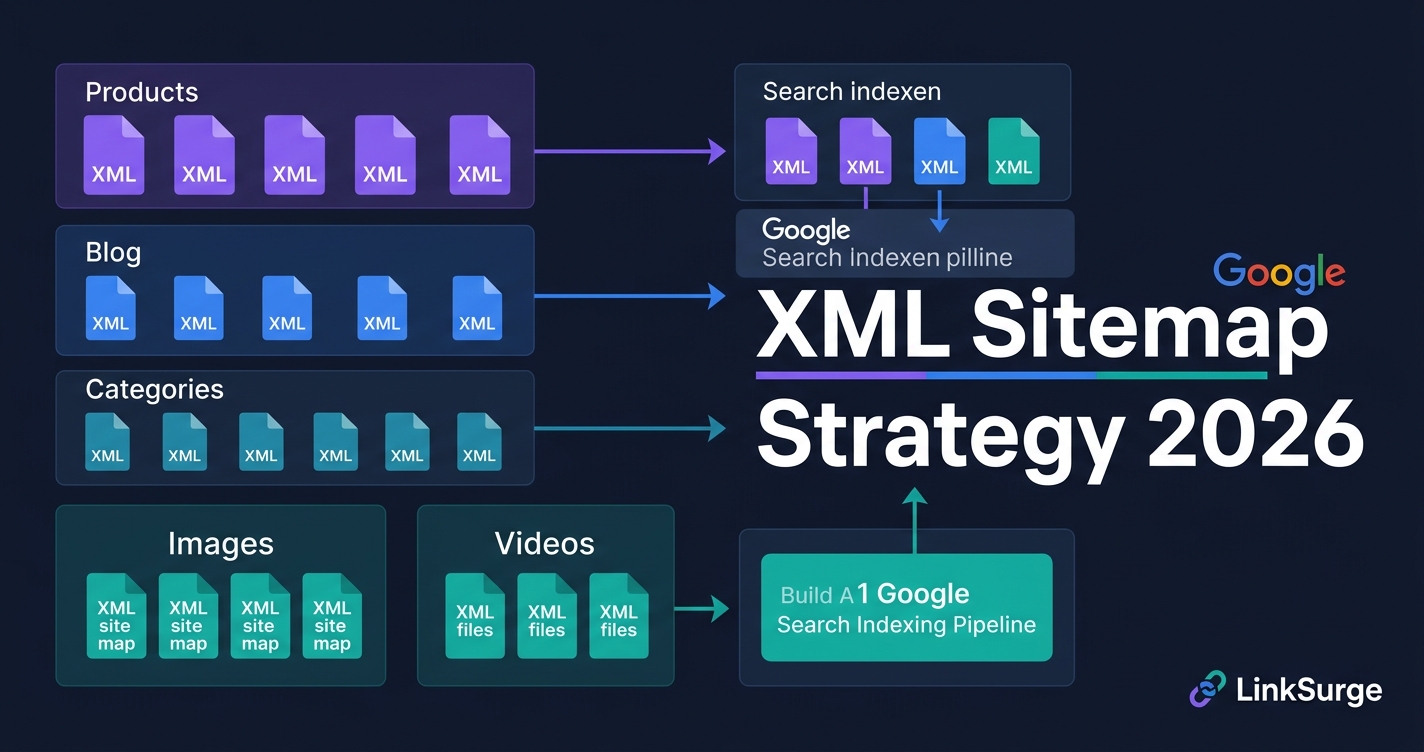
XML Sitemap Strategy 2026: Segmentation & Crawl Budget Optimization
目次
Key Takeaways: Turn Your Sitemap from a Forgotten File into a Crawl and Indexing Asset
After digging into dozens of client sitemaps, here's what stands out: most sites upload one XML sitemap to Search Console and never touch it again. These five points are what you need to fix in 2026.
- Segmentation is non-optional — Instead of one massive sitemap.xml, split by content type, business value, and update frequency. One e-commerce site saw product index rates jump from 87% to 98% after segmenting into five sitemaps
- Crawl budget is a finite resource — Google allocates a limited crawl budget to your site. Low-value pages in your sitemap steal crawls from pages that actually matter
- Among standard URL metadata, only
<lastmod>carries weight — within the same<url>entry, both Google and Bing ignore<priority>and<changefreq>. Accurate last-modified dates are what trigger recrawls; rewriting them on every build destroys that trust - Dynamic generation keeps your sitemap current — Static sitemaps go stale the moment you create them. Automate additions, removals, and timestamp updates
- Image and video sitemaps expand search visibility — With visual search growing in 2026, dedicated image-sitemap.xml and video-sitemap.xml files capture traffic you're currently missing
Let's break each of these down.
1. Why the 2015 Sitemap Playbook Fails in 2026
Here's the thing: uploading a sitemap.xml to Google Search Console and never touching it again stopped working years ago.
Back in 2015, Google's crawl budget was relatively generous. You could stuff every URL into one sitemap and Googlebot would dutifully crawl them all. The 2026 reality is fundamentally different.
For the basics of crawling and indexing, see How Search Engines Work. If a page is in your sitemap but still not on Google, work through Why Isn't My Page on Google?
Three Problems with Abandoned Sitemaps
- Crawl budget waste: Duplicate content, stale URLs, and noindex pages in your sitemap consume crawl budget on pages that don't matter
- Contradictory signals: Including noindex pages in your sitemap sends Google mixed messages — "please index this" and "don't index this" simultaneously
- Index delays: Cramming 50,000+ URLs into a single file slows processing and delays discovery of new content
In my testing, an e-commerce client using a single monolithic sitemap had a product page index rate of just 87%. That's 13% of their products invisible to Google.
References: Build and Submit a Sitemap - Google Search Central Crawl Budget Optimization: Complete Guide for 2026 - LinkGraph Sitemap Best Practices: Everything You Need to Know - Respona
2. Strategy #1: Multiple Segmented Sitemaps
This is where it gets interesting. The era of one-sitemap-fits-all is over.
Segmentation Design Criteria
| Segmentation Axis | Example Files | Priority Level |
|---|---|---|
| Content type | sitemap-products.xml, sitemap-blog.xml | High |
| Business value | sitemap-highmargin.xml, sitemap-clearance.xml | High |
| Update frequency | sitemap-frequent.xml, sitemap-rare.xml | Medium |
| Language/region | sitemap-en.xml, sitemap-ja.xml | Medium |
| Archive | sitemap-archive.xml, news-sitemap.xml | Low |
Reference all of them from a sitemap-index.xml. Keep each sub-sitemap under 10,000–20,000 URLs for optimal processing speed — well below the protocol limit of 50,000.
Why Segmentation Works
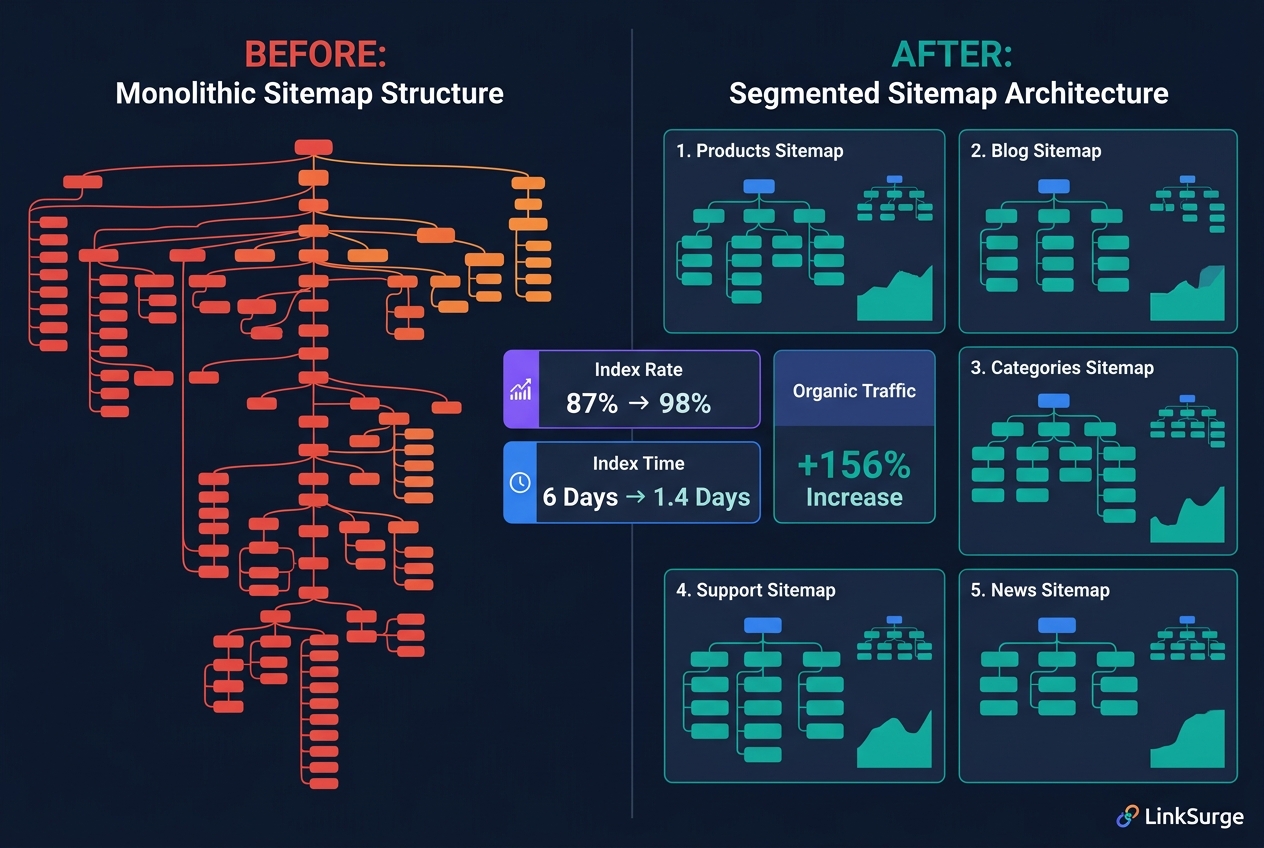
The data is clear. A 50,000-page e-commerce site segmented into five type-specific sitemaps saw these results after 60 days:
- Product page index rate: 87% → 98%
- Average time to index: 6 days → 1.4 days
- Organic traffic: +156%
Same pages. Better organization. That's not because search engines read a <priority> signal from the segmented files — as covered below, both Google and Bing ignore that tag entirely. What actually moved the needle was more likely a combination of lighter, more reliably processed files, being able to isolate coverage issues per segment in Search Console, and the cleanup of duplicate, noindex, and stale URLs that typically happens alongside a segmentation project.
For a comprehensive view of SEO fundamentals alongside sitemap strategy, check out our "Complete SEO Guide 2026."
References: XML Sitemap Best Practices for SEO - BrightSEO Tools Protocol - sitemaps.org Crawl Budget: What Is It and Why It Matters - Briteskies
3. Strategy #2: Getting <lastmod> Right
As the takeaways above note, of the standard <url> metadata — <lastmod>, <priority>, and <changefreq> — <lastmod> is the only one Google actually reads. Which means this is where your sitemap effort pays off the most.
Image and video sitemap extensions are a separate matter; Google does use those, and Section 7 covers them. The comparison here is strictly about standard URL metadata.
Why <lastmod> Is the One That Works
Google uses <lastmod> for recrawl scheduling. When you declare "this URL has changed since your last crawl," Google can concentrate a finite crawl budget on pages that actually moved. The bigger your site, the more directly this translates into index freshness.
But that only holds if your declaration is trustworthy. This is where most implementations fall apart.
Rules for Accurate <lastmod>
- Use ISO 8601 format:
2026-04-16or2026-04-16T09:00:00+09:00 - Update only on substantive changes: Google points to meaningful changes in content, structured data, and links. Purely cosmetic tweaks don't count — but a template change does if it alters structured data or internal linking
- Give each page its own date: if every URL shares the same timestamp, you aren't tracking updates — you're just stamping a build date
The Most Common Failure: Every Build Updates Every Page
Honestly, this is the single most frequent mistake I see in the wild.
Depending on your static site generator or CMS configuration, every deploy rewrites <lastmod> on every URL to "today." Passing new Date() straight into sitemap generation is the classic version of this. Nothing changed, yet every page declares itself updated, every single day.
Let that run long enough and Google stops trusting your <lastmod> declarations altogether. You lose the ability to trigger a recrawl when you genuinely do update something — which makes this worse than not setting the tag at all.
Build <lastmod> around actual change detection. Not the publish date, not the build date — the date you last touched the content itself.
A Note on <priority> and <changefreq>
Short version: they aren't worth tuning. Both Google and Bing officially state they ignore these two tags. Yandex is among the few engines that documents using priority as a crawl-prioritization hint.
If your CMS or plugin emits them automatically, leave them. Just avoid setting every page to 1.0 — for Yandex and for your own internal documentation alike, "everything is equally important" says nothing. If you do set them, a coarse split (homepage higher, legal pages and archives lower) is plenty.
Deciding Where to Spend Your Effort
Where to direct limited maintenance hours is a separate question worth answering deliberately. A weighted score keeps that decision consistent:
Investment priority = (Page Authority × 0.3) + (Conversion Rate × 0.4) + (Search Volume × 0.3)
Normalize each input to a 0–1 range before applying the weights. Backlink counts, conversion rates, and search volumes use different units and magnitudes, so combining them raw makes the coefficients meaningless.
The key point: this is not a number you write into your XML. It's a ranking that tells you which pages get accurate <lastmod> upkeep, stronger internal links, and content refreshes first.
References: Build and Submit a Sitemap - Google Search Central The Importance of Setting the "lastmod" Tag in Your Sitemap - Bing Webmaster Blog Using the Sitemap file - Yandex Webmaster XML Sitemaps: What They Are & Why They Matter - Search Engine Land
4. Strategy #3: Dynamic Sitemap Generation
Static sitemaps start going stale the moment you save them. Honestly, the number of sites I've seen with deleted pages and broken redirects still living in their sitemaps is staggering.
Four Automations to Implement
- Auto-add new pages: Reflect content publication in the sitemap immediately
- Auto-remove deletions and redirects: Strip pages from the sitemap when they're removed or redirected
- Auto-update
<lastmod>: Detect meaningful content changes and update timestamps - Prioritize change detection on key pages: Use analytics data to identify your highest-value pages, then make sure substantive edits to those pages reliably update
<lastmod>
Implementation Approaches
- WordPress: Yoast SEO, RankMath, or AIOSEO auto-submit on content updates
- Next.js: Dynamic generation via
app/sitemap.tsat build time - Custom: Python or Node.js scripts querying the CMS/database on a cron schedule
Platforms like LinkSurge, Screaming Frog, and Sitebulb can monitor your index status and flag sitemap issues before they impact rankings.
References: XML Sitemaps: Structure, Implementation & SEO Best Practices 9 Best XML Sitemap Generator Tools - Yotpo 8 Crucial XML Sitemap Best Practices - TrySight
5. Strategy #4: Strategic Crawl Budget Allocation
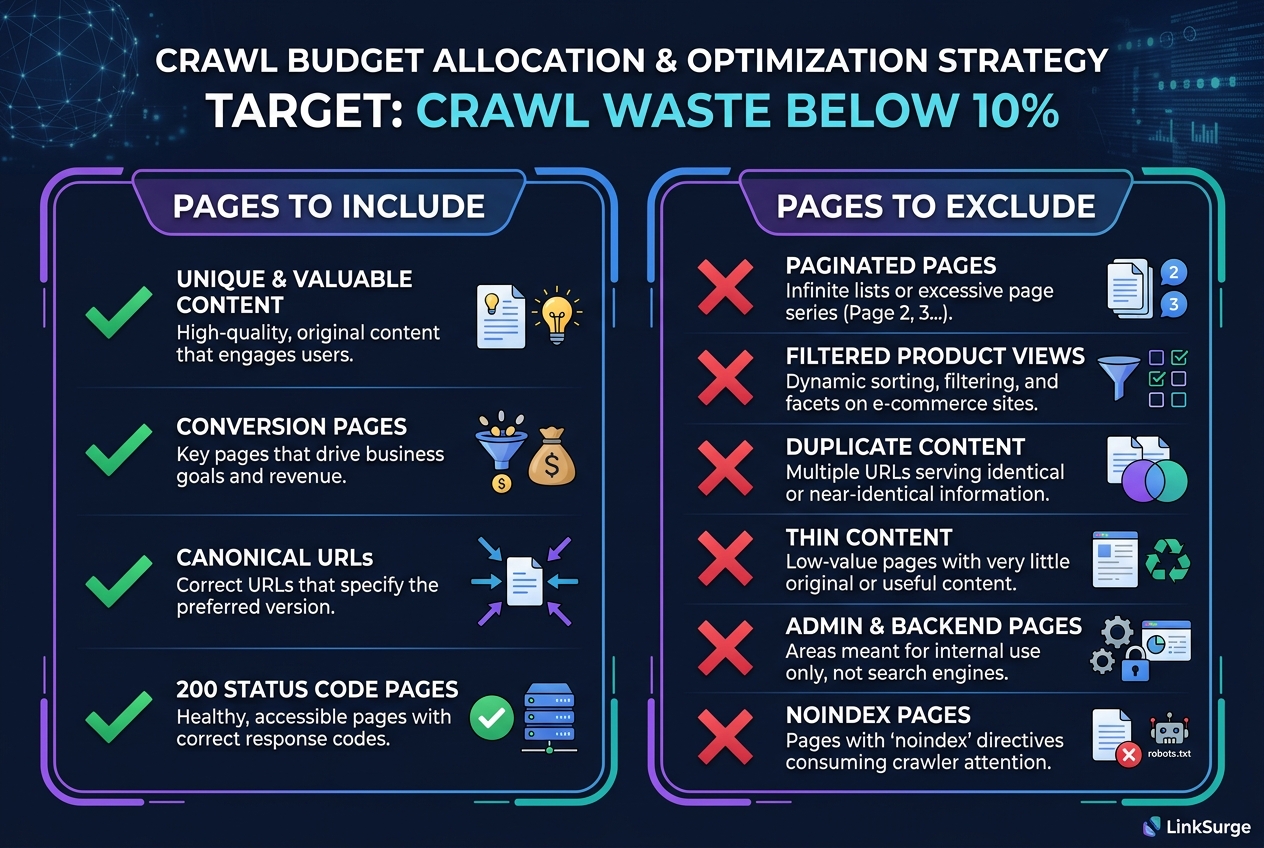
Google assigns a finite crawl budget to your site. That budget fluctuates based on server health, traffic patterns, page speed, and content freshness.
What to Include vs. Exclude from Your Sitemap
Include:
- Unique, valuable content pages
- Pages with conversion potential
- Canonical URLs only
- Pages returning 200 status codes
Exclude:
- Paginated pages (handle with
rel=next/prev) - Filtered product pages (parameter URLs)
- Duplicate content variations
- Thin content pages
- Admin and login pages
- Pages with noindex directives
How to Identify Crawl Budget Waste
Analyze server logs to spot Googlebot hitting low-value pages frequently. Tools like Botify, ContentKing, or JetOctopus automate this analysis.
Target a crawl-budget waste ratio below 10%. One enterprise client that cleaned up their sitemap and robots.txt saw impressions increase 79%, clicks increase 62%, and SEO-driven revenue grow by $786,000 in three months.
References: Crawl Budget Optimization for Enterprise Sites - ALM Corp 5 Ways to Get Better Log File Insights - Search Engine Journal Log file analysis for SEO - Search Engine Land

LinkSurge
linksurge.jp
SEO・AIO・GEO統合分析プラットフォーム。AI Overviews分析、SEO順位計測、GEO引用最適化など、生成AI時代のブランド露出を最大化するための分析ツールを提供しています。
6. Strategy #5: Monthly Sitemap Audits
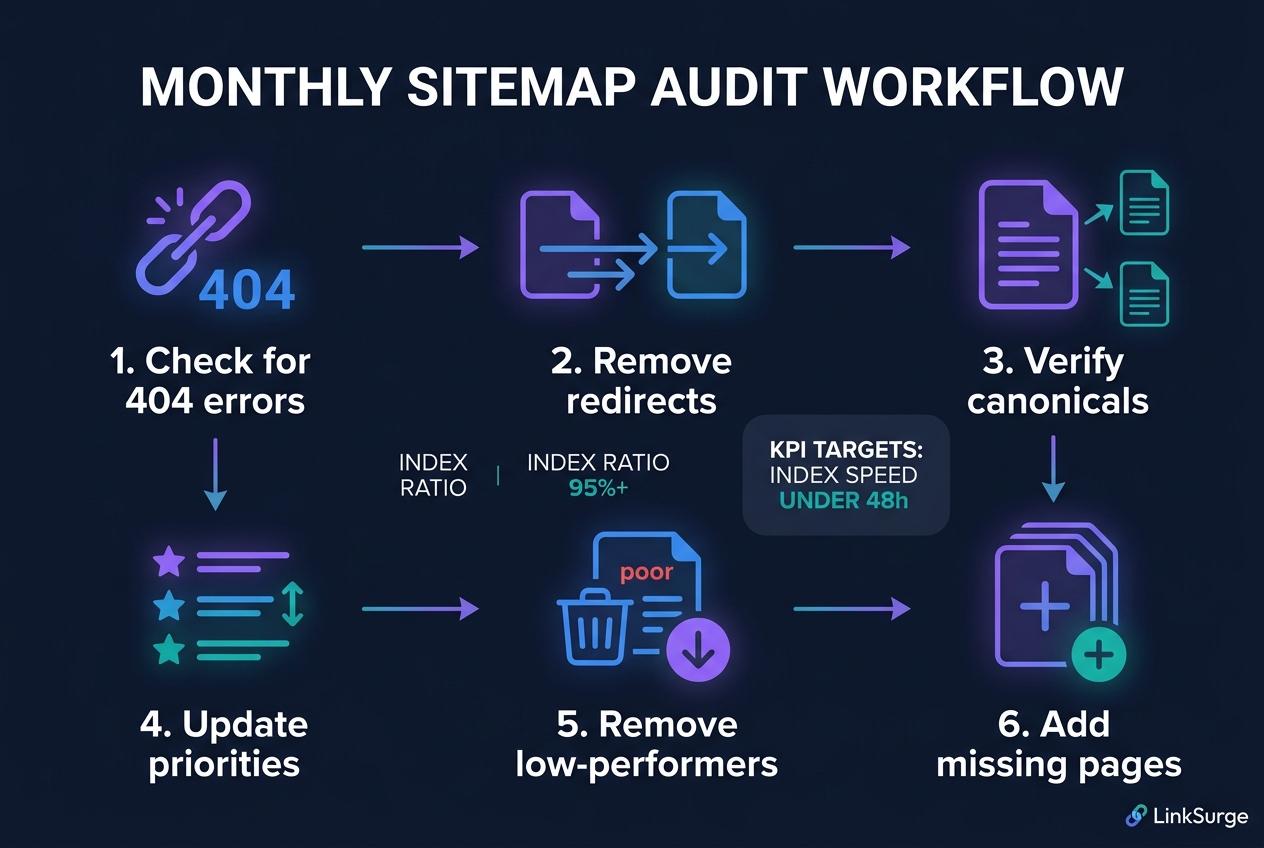
An abandoned sitemap actively harms your indexing. That's not hyperbole — it's what the data shows.
Monthly Audit Checklist
- Check for 404 errors: URLs in your sitemap returning 404 are critical errors
- Remove redirected URLs: Strip 301/302 redirects from the sitemap
- Verify canonical alignment: Ensure canonical URLs match sitemap entries
- Audit
<lastmod>accuracy: Check that timestamps line up with substantive changes to content, structured data, or links — and that pages don't all share one date - Remove low-performers: Drop pages with no traffic and no conversions
- Add missing high-performers: Ensure all important pages are represented
Monitoring KPIs in Search Console
Track these metrics weekly:
- Submitted vs. indexed ratio: Aim for 95%+
- Coverage errors: Check weekly
- Index speed: Target under 48 hours from submission to index
- Crawl frequency per sitemap: Compare across segments
- Valid vs. excluded pages: Analyze exclusion reasons
To understand how AI search is reshaping SEO priorities, see "AI Search Impact on SEO."
References: How to Monitor & Submit Sitemaps in GSC - Quattr XML Sitemaps & Robots.txt: Guide - Straight North How to Set Up XML Sitemaps for SEO Success - RebelMouse
7. Strategy #6: Image and Video Sitemaps for Visual Search
Visual search is bigger than ever in 2026. Google Lens, image search, and video search drive significant traffic — and dedicated sitemaps help you capture it.
image-sitemap.xml Structure
<url>
  <loc>https://example.com/product/item-1</loc>
  <image:image>
    <image:loc>https://example.com/images/item-1.jpg</image:loc>
    <image:title>Product description</image:title>
    <image:caption>Detailed product caption</image:caption>
  </image:image>
</url>
Include these image types:
- Product images (essential for e-commerce)
- Infographics
- Featured article images
video-sitemap.xml Required Tags
Video sitemaps have several mandatory fields:
<video:title>: Video title<video:description>: Description<video:content_loc>or<video:player_loc>: Video file or player URL<video:thumbnail_loc>: Thumbnail image<video:publication_date>: Publication date
Include these video types:
- Tutorial videos
- Product demos
- Explainer content
For Smaller Sites
If you only have a handful of images or videos, embed the image:image or video:video namespaces directly in your main sitemap rather than creating separate files. Scale to dedicated files as your catalog grows.
LinkSurge helps you analyze your site's technical SEO health, including sitemap integrity and indexing gaps.
References: Image Sitemaps - Fundamentals and Best Practices - SEO Day Incorporating Video and Image Content in XML Sitemaps - Peak Positions Sitemap Best Practices - Respona
8. Common XML Sitemap Mistakes in 2026
Before implementing the strategies above, check whether you're making any of these errors. Even one can turn your sitemap from an asset into a liability.
- Including noindex pages: Sends contradictory signals to Google
- Listing non-canonical URLs: Creates confusion between canonical tags and sitemap entries
- Exceeding 50,000 URLs in one file: Invalidates the entire sitemap
- Never updating
<lastmod>: Google can't detect freshness signals - Including parameter URLs: Filter and sort parameters belong nowhere near your sitemap
- Missing image/video sitemaps: Leaving visual search traffic on the table
- Not monitoring Search Console errors: Submitting and forgetting is the root cause of most sitemap problems
For a beginner-friendly guide to modern SEO fundamentals, see "SEO in 2026: Beginner's Guide to AI-Era Optimization."
References: Build and Submit a Sitemap - Google Search Central XML Sitemap Best Practices for SEO - BrightSEO Tools 8 best sitemap generator tools - Zapier
LinkSurge
linksurge.jp
SEO・AIO・GEO統合分析プラットフォーム。AI Overviews分析、SEO順位計測、GEO引用最適化など、生成AI時代のブランド露出を最大化するための分析ツールを提供しています。
Frequently Asked Questions
At what site size should I start segmenting my sitemap?
Segmentation is recommended for sites with 1,000+ pages. Even smaller sites benefit if content types are clearly distinct (e.g., blog posts + product pages). Above 10,000 pages, segmentation becomes essential for maintaining healthy index rates.
If Google ignores <priority>, is there any point setting it?
Both Google and Bing ignore it, but Yandex officially uses it as a crawl-prioritization hint. It also serves as internal documentation for URL importance. If the setup cost is low, keep it — but invest your energy in accurate <lastmod> timestamps, which can help Google schedule recrawls when they're accurate and reflect genuine changes.
How often should a dynamic sitemap update?
Match your content update cadence. E-commerce sites should update in real time when products are added or removed. Blogs can update on publish. Corporate sites can refresh weekly. The key is that <lastmod> accurately reflects actual content changes.
What should I check if my sitemap index rate drops below 80%?
Start with the Coverage report in Search Console. The most common culprits are duplicate content, noindex pages, and redirect chains still listed in the sitemap. Remove those URLs, fix canonical settings, and resubmit. Then monitor weekly until the rate recovers to 95% or higher.
Conclusion: Start Treating Your Sitemap as Discovery and Indexing Infrastructure
Your XML sitemap is not just a file for Google. It helps search engines discover relevant URLs and understand which pages have materially changed.
Worth being precise here: a sitemap can't dictate crawl order. Google treats it as a hint for finding what to crawl, not as an instruction to process URLs in the order or priority you submitted them.
The same goes for rankings — a sitemap is not a ranking factor. It has no mechanism to push a page up the results. What it affects is the stage before that. Since a page that isn't indexed can't rank at all, reliable discovery and indexing is what gets you to the starting line.
Segment it. Keep <lastmod> accurate. Maintain it. Monitor it. Stop treating your sitemap like a checkbox and start treating it like the discovery and indexing infrastructure it is. The goal: 95%+ index rates and new content indexed within 48 hours.
LinkSurge's SEO analysis tools help you monitor indexing health and technical SEO improvements in real time.