Is Your Site Showing Up in Google AI Overviews? A Beginner's Guide to Finding the Keywords Where You're Cited
目次
Key Takeaways: You Can't Tell From Rankings Alone. Check Keyword by Keyword
Google now shows an AI-written answer at the very top of many search results. That's AI Overviews. The question I hear most from teams new to SEO is simple: "Are we in there?" This guide shows you how to find out.
- AI Overviews is an AI summary above the search results — Next to or below the answer, Google lists links to the pages it drew from. Getting your page into those citations is the new kind of visibility in AI search
- When an AI Overview appears, clicks drop — Ahrefs' February 2026 analysis found the top-ranking page gets a 58% lower average click-through rate when an AI Overview is present. If you're not cited, a high ranking gets noticed less
- Search Console now shows which pages appear, but not which keywords — Search Console's generative AI performance report, available to sites worldwide since August 31, 2026, shows impressions in AI Overviews and AI Mode by page. It doesn't break them down by keyword, and it doesn't show where you sit among the citations
- Start by mapping your "visibility keywords" across the whole domain — A keyword visibility tool such as LinkSurge's AIO keyword analysis takes a domain and lists every keyword where you're cited, your position inside the AI Overview, and the search volume
Let's walk through the basics, the three ways to check, how to read the results, and what to do next.
1. What Are AI Overviews?
AI Overviews is the AI-generated summary Google shows at the top of the results page for many searches. It answers the question in a few lines or paragraphs and adds links to the web pages it used as sources.
Those links are citations. When your page is cited, your brand and a link to your site appear at the very top of the results.
Here's the thing: citations are chosen separately from the regular rankings. A page ranking tenth can be cited while the page ranking first is not. So "we track our rankings" is not the same as "we know our AI Overviews visibility." You have to check it directly.
Google says there are no additional requirements or special settings to appear in AI Overviews. The usual SEO basics, Google being able to read your page and your page answering the question well, are the foundation.
References: AI Features and Your Website - Google Search Central
2. Why Checking Matters
The short answer: keywords that trigger an AI Overview send fewer clicks to the results below it.
| Study | Finding |
|---|---|
| Ahrefs (published February 2026) | The top-ranking page had a 58% lower average CTR on keywords with an AI Overview (300,000 informational keywords, December 2025 vs. December 2023) |
| Pew Research Center (published July 2025) | Users clicked a regular search result on 8% of visits with an AI summary, versus 15% without one. Links inside the summary were clicked on 1% of visits |
The pattern is clear. When an AI Overview appears, many people read the answer and never scroll down.
Honestly, that breaks the old assumption that "higher rankings mean more traffic" for a meaningful share of keywords. The flip side is that a citation puts your name at the top of the page. Knowing which keywords trigger AI Overviews, and where you're cited among them, is the starting point for everything else.
For the bigger picture of how AI search is changing SEO, see "AI Search Impact on SEO."
References: Update: AI Overviews Reduce Clicks by 58% - Ahrefs Do people click on links in Google AI summaries? - Pew Research Center
3. Three Ways to Check
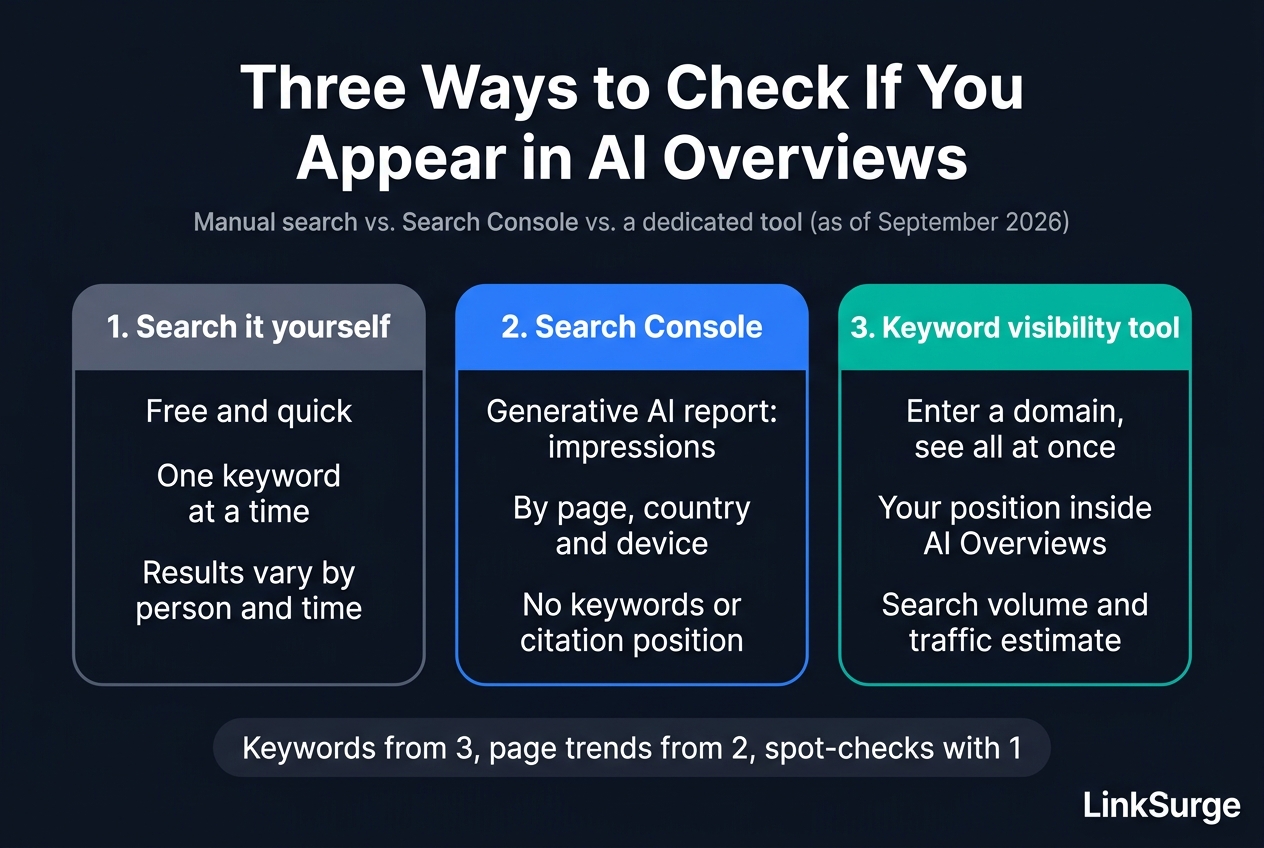
Option 1: Search it yourself
The quickest way is to search a keyword on Google and look for your page among the AI Overview's citations. It's free and instant.
The catch: one keyword at a time, and AI Overviews can vary by person and by time of day. It works for spot-checking a handful of important terms, not for understanding your whole site.
Option 2: Look in Search Console
Google Search Console shows your impressions and clicks in search. What it tells you about AI Overviews depends on which report you open.
In the regular Performance report, appearances in AI features such as AI Overviews are included under the "Web" search type, so you can't tell them apart from ordinary results.
The generative AI performance report is different. Google began offering it to some sites in June 2026 and finished rolling it out to sites worldwide on August 31, 2026. It shows how many times links to your site appeared in AI Overviews and AI Mode, broken down by page, country, device and date. It's the quickest way to see which pages show up in AI features. The report may not appear if your site hasn't had enough impressions in AI features.
What it doesn't have is a query (keyword) dimension. It also doesn't show clicks, it combines AI Overviews and AI Mode, and it doesn't show your position among the citations. To learn which keywords cite you, and where, you still need another method.
References: Generative AI performance report (Search) - Search Console Help Introducing Search Generative AI performance reports in Search Console - Google Search Central Blog
Option 3: Use a keyword visibility tool
The third option is a tool that takes your domain and returns every keyword where you're cited in AI Overviews. You see the whole site at once, including your position among the citations.
My recommended order: map your keywords with option 3, track page-level impressions over time in the generative AI report from option 2, and spot-check your most important terms by hand with option 1.
4. Step by Step: LinkSurge's AIO Keyword Analysis
Here's how the process looks in LinkSurge's AIO keyword analysis. The screenshots use sample data for a fictional domain (example-company.co.jp), and the interface is in Japanese. For an overview of the feature and its workflow, see the AIO keyword analysis feature page (in Japanese).
Step 1: Enter a domain and choose the scope
Enter the domain you want to check (for example, example.com) and choose a match type.
| Match type | Scope | When to use it |
|---|---|---|
| Domain match | The whole domain | Your first overall check |
| Prefix match | Everything under a directory or subdomain | Only the blog (/blog/) or one product section |
| Exact match | One URL | Which keywords cite a specific article |
Start with domain match. Pick the market and language you care about; the tool supports Japan, the US and the UK, in Japanese or English.
Step 2: Choose how many keywords to fetch and run it
You can fetch 100, 500 or 1,000 keywords, which costs 30, 50 or 100 points respectively. If nothing is found, no points are used. For a small site, 100 is plenty.
Click the start button (labeled 分析開始) and stay on the page until the results load. Results stay in your history for 12 hours.
Step 3: Read the summary
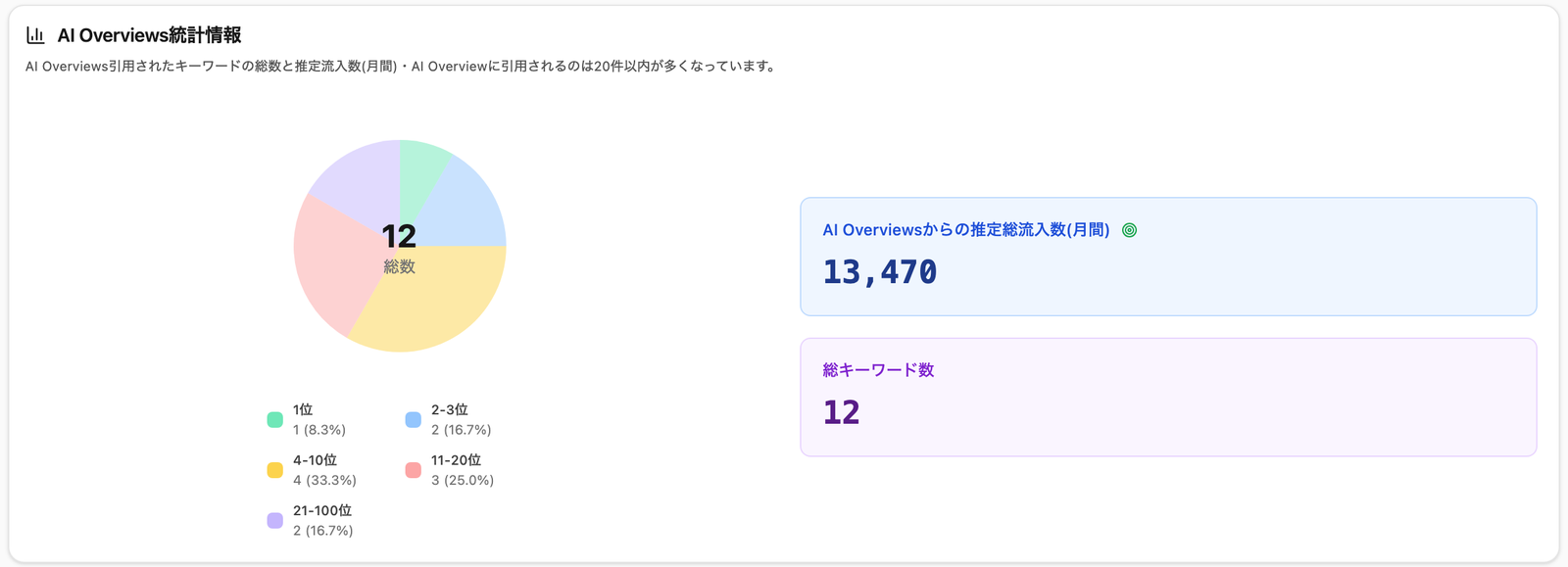
The first panel summarizes everything.
- Total keywords: How many keywords cite one of your pages in an AI Overview
- Estimated monthly traffic from AI Overviews: A rough estimate based on each keyword's search volume and your position among the citations
- Position breakdown: How often you're cited first, 2nd–3rd, 4th–10th, 11th–20th or 21st–100th
In the sample, the domain was cited for 12 keywords: once in first place, twice in 2nd–3rd, and four times in 4th–10th.
Step 4: Read the keyword list
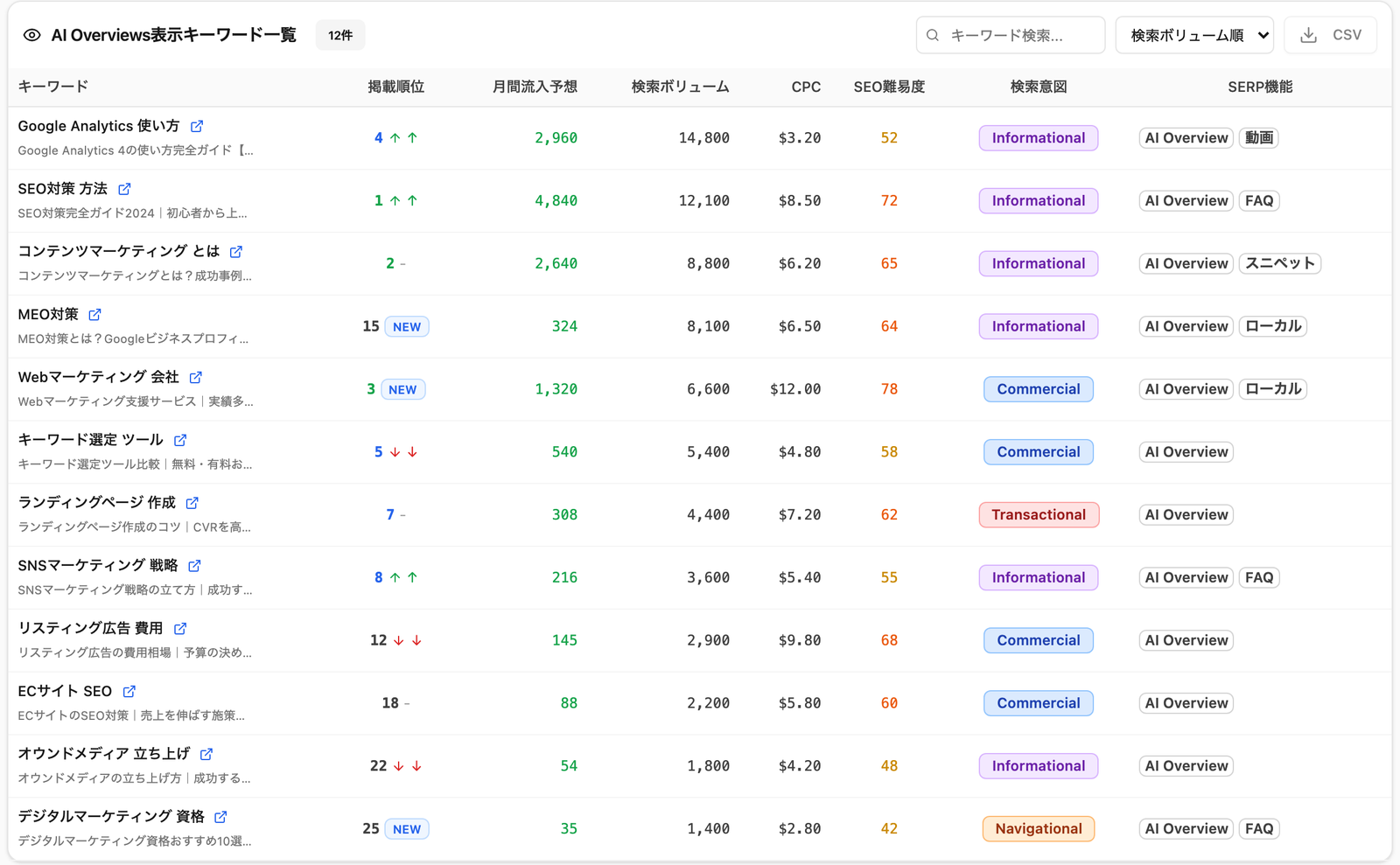
Below the summary is the full keyword list. You can sort by search volume or position, filter by keyword, and export to CSV.
LinkSurge
linksurge.jp
SEO・AIO・GEO統合分析プラットフォーム。AI Overviews分析、SEO順位計測、GEO引用最適化など、生成AI時代のブランド露出を最大化するための分析ツールを提供しています。
5. How to Read the Results: Four Columns to Start With
The table has a lot of columns. As a beginner, focus on four.
| Column | What it means | What to look for |
|---|---|---|
| Keyword (the small text is the page title) | The keyword and the page cited for it | Is an unexpected page being cited? |
| Position | Where you sit among the AI Overview's citations | Lower numbers are listed first. Aim to grow your count in positions 1–3 |
| Estimated monthly traffic | A rough traffic estimate for that keyword | Prioritize work from the largest numbers down |
| Search intent | What the searcher wants: information, comparison, or purchase | Commercial and transactional keywords sit closest to revenue |
"NEW" next to a position marks a keyword that wasn't cited in the previous data. The up and down arrows show whether your position rose or fell since then.
You may find that the page being cited isn't the article you invested in, but an older glossary page. AI Overviews lift the passage that answers the question most directly, so a short page with a clear definition can win. We looked at which parts of a page actually get quoted in "Where Does AI Search Actually Quote From?"
6. What to Do Next
Once you have the list, work in this order.
1. For keywords where you're cited, improve your position. For anything in 4th place or lower, revisit the cited section of the page. Answer each heading's question completely within that section so the AI can lift it cleanly.
2. For important keywords that are missing, find out why. Check whether an AI Overview appears at all, or whether it appears and cites someone else. LinkSurge's AIO optimization analysis breaks down a single keyword's AI Overview and shows what to change to get cited. The walkthrough is in "What Pages Cited in Google AI Overviews Have in Common."
3. Run the same analysis on your competitors. You'll find keywords where a competitor is cited and you're not. That's where the biggest upside is.
Repeat the analysis about once a month and log your total keywords and estimated traffic, and you'll see whether your changes are working. For a deeper look at what drives citations, see "Google AI Ranking Factors: What 130+ Experts Scored Highest."
7. Caveats
- Visibility data comes from search results collected periodically. AI Overviews vary by user and time, so it won't match every live search exactly
- Estimated traffic is calculated from search volume and position. Check real traffic in Search Console or Google Analytics
- Being cited doesn't guarantee clicks. Treat a citation as a way to get noticed, not only as a traffic source
Frequently Asked Questions
Is there a free way to check whether my site appears in AI Overviews?
Yes. Search a keyword on Google and look for your page among the AI Overview's citations. It only covers one keyword at a time and results can vary by user and time, so a keyword visibility tool is more efficient for checking a whole site.
Can I see my AI Overviews performance in Search Console?
Partly. The generative AI performance report, fully rolled out worldwide as of August 31, 2026 (it may not appear if your site has too few AI impressions), shows impressions in AI Overviews and AI Mode by page, country, device and date. It doesn't break data down by keyword, doesn't show clicks or your position among the citations, and combines AI Overviews with AI Mode. To see it keyword by keyword, you need a separate tool.
How many points does LinkSurge's AIO keyword analysis use?
It depends on how many keywords you fetch: 30 points for 100, 50 points for 500 and 100 points for 1,000. If no keywords are found, no points are used. For a first run or a small site, 100 keywords is enough.
Why doesn't my page get cited even though it ranks first?
AI Overviews choose citations separately from the regular rankings. Higher-ranking pages tend to be cited more often, but if your page doesn't answer the question clearly in one place, another page may be chosen. Compare the cited competitor's answer with yours.
Conclusion: Build the Map First
Working on AI Overviews starts with knowing where you're already cited. Rankings don't tell you, and Search Console's generative AI report stops at the page level, so the first job is building a map of your visibility keywords. With that map in hand, the keywords to grow, the ones to investigate and the ones competitors are taking become obvious.
Start with a monthly check and add one cited keyword at a time.
LinkSurge's AIO keyword analysis lists every keyword where your domain is cited in AI Overviews, with your position and a traffic estimate, from a single domain input.